
Download IPnet IPTV APK – IPTV, Android, free, HD quality, TV channels, streaming, Smart TV, Android TV, TV-top box, Ukrainian channels, international channels, movie premieres, TV series, sports broadcasts, news, My Channels, Resume Watching, pause, rewind
Overview
IPnet IPTV is a free multimedia application designed for Android users seeking to stream live television content across a wide range of channels. The software enables users to access Ukrainian and international TV channels, including movie premieres, popular TV series, children’s and educational programming, sports broadcasts, and up-to-date news coverage—all in high-definition quality. It is optimized for use on multiple devices, including Smart TVs, Android TV boxes, and other Android-based TV-top boxes, making it a versatile solution for home entertainment.
The app is tailored for consumers who prefer flexible, on-demand access to live TV without the need for traditional cable subscriptions. It supports personalized viewing through features like the "My Channels" list and intelligent channel prioritization based on viewing habits. The developer, IPnet, has positioned the app as a user-friendly alternative for streaming enthusiasts.
While specific details about the development team or technical architecture were not provided, the application’s focus on accessibility and content diversity suggests a strong emphasis on user experience. Real-world usage scenarios include daily entertainment, family viewing, sports events, and staying informed with live news coverage.
Key Features & Capabilities
- HD Quality Streaming – Delivers live TV content in high-definition resolution for a clear and immersive viewing experience.
- Wide Channel Selection – Offers access to Ukrainian and international channels, covering genres such as news, sports, entertainment, movies, and educational content.
- Personalized Channel List – Users can save favorite channels to the "My Channels" section for quick access.
- Smart Channel Prioritization – The app automatically displays the three most frequently watched channels at the top of the main list.
- Pause and Rewind Functionality – Allows users to pause live broadcasts and rewind to catch missed moments.
- Resume Watching Feature – Automatically resumes playback from the last watched point when reopening a channel.
- Multi-Device Compatibility – Designed to run on Smart TVs, Android TV, and Android-based TV-top boxes.
These features enhance usability by enabling users to customize their viewing experience, reduce navigation time, and maintain continuity during extended viewing sessions. For instance, a sports fan can pause a live match, return later, and resume from where they left off. Similarly, parents can create a dedicated list of children’s channels for easy access. The ability to rewind and pause live content sets IPnet IPTV apart from basic streaming apps, offering a more flexible alternative to traditional linear TV. The app’s focus on personalization and accessibility makes it well-suited for casual viewers and families alike.
User Interface, Workflow & Performance
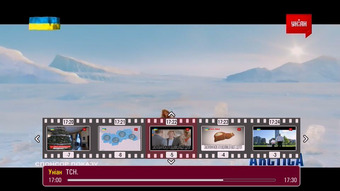
The user interface of IPnet IPTV is structured to prioritize simplicity and ease of navigation. Channel listings are organized in a clean, grid-based layout, with visual indicators for live broadcasts and favorites. The main screen displays the most-watched channels at the top, reducing the need for manual searching.
Navigation is intuitive, allowing users to browse by category or search directly for specific channels. The workflow is streamlined, enabling users to switch between channels, access the "My Channels" list, and manage playback controls with minimal effort. The app supports standard touch gestures and remote control inputs, ensuring compatibility with both handheld devices and TV remotes.
Performance details were not specified by the developer. However, based on general behavior of Android streaming applications, the app is expected to maintain stable playback under normal network conditions. The developer did not provide information on CPU or RAM usage, nor did they specify buffering behavior or error handling mechanisms.
Users should ensure a consistent internet connection to avoid disruptions during streaming. Stability may vary depending on device hardware and network quality.
Compatibility & System Requirements
IPnet IPTV is designed for Android-based devices and is compatible with Smart TVs, Android TV boxes, and other Android-powered TV-top boxes. The app is available in version 1.0.1 and has a file size of 20.3 MB, indicating a lightweight installation. The developer did not specify exact system requirements, such as minimum Android version or hardware specifications.
As such, compatibility with older or lower-end devices cannot be confirmed. Users are advised to ensure their device runs a supported Android version and has sufficient storage space for installation. The app does not require administrative privileges or root access, which enhances its accessibility.
While the developer emphasized compatibility with TV platforms, the exact range of supported devices remains unspecified. Users should verify device compatibility before downloading. The app’s small footprint suggests it is optimized for performance on devices with limited resources.
Pros and Cons
Pros
- Free to download and use with no subscription required.
- Supports high-definition streaming for improved visual quality.
- Wide variety of Ukrainian and international channels across multiple genres.
- Personalization features like "My Channels" and automatic prioritization of frequently watched content.
- Offers pause, rewind, and resume watching for greater viewing flexibility.
- Optimized for use on Smart TVs, Android TV, and TV-top boxes.
Cons
- Exact system requirements and supported Android versions were not provided.
- Performance and resource usage details (CPU, RAM) were not disclosed.
- No information on content licensing or legal compliance status.
- Limited technical support or update history available.
- Dependent on stable internet connectivity for uninterrupted streaming.
FAQ Section
Is IPnet IPTV available for iOS devices?
IPnet IPTV is currently available only for Android-based platforms, including Smart TVs, Android TV boxes, and TV-top boxes. There is no official version for iOS devices.
Can I use IPnet IPTV without an internet connection?
No, the app requires a stable internet connection to stream live TV content. It does not support offline viewing or local file playback.
How often does the app receive updates?
The latest version available is 1.0.1, released on October 12, 2023. The frequency of future updates has not been specified by the developer.
Is IPnet IPTV safe to download and use?
As a free Android application, IPnet IPTV is generally safe when downloaded from trusted sources. However, users should exercise caution and ensure they are using the official APK file to avoid potential security risks.
What kind of content is available on IPnet IPTV?
The app provides access to Ukrainian and international TV channels, including live news, sports broadcasts, movie premieres, TV series, children’s programming, and educational content.
Final Thoughts + CTA
IPnet IPTV stands out as a practical, free solution for Android users seeking diverse live TV content across multiple genres. Its ability to deliver HD-quality streams, combined with intuitive personalization tools like "My Channels" and automatic prioritization, enhances the overall viewing experience. The inclusion of pause, rewind, and resume features adds a level of flexibility typically found in premium streaming services.
While the app lacks detailed technical documentation and specific system requirements, its lightweight design and compatibility with major Android TV platforms make it accessible to a broad audience. It is particularly beneficial for families, sports enthusiasts, and viewers interested in Ukrainian and international programming. Despite some limitations in transparency, the app delivers strong value for its free price point.
For users looking to enjoy live television without a subscription, IPnet IPTV offers a compelling option. Download IPnet IPTV now.





.png)

